The Biggest Email Mistakes Professionals Make (And How To Fix Them)
The Biggest Email Mistakes Professionals Make (And How To Fix Them)
Estimated Reading Time: 13–15 minutes

Introduction: Most Email Problems Are Not About Grammar — They Are About Clarity
Most email problems are not caused by bad grammar. They are caused by unclear communication.
This distinction matters more than most professionals realize.
Think about the last time an email you sent did not get a response. Or the last time a simple request turned into a three-day back-and-forth thread. Or the last time you sent a follow-up and felt the relationship cool slightly because of how the message landed.
Those outcomes are rarely about spelling. They are about purpose, structure, tone, and intent — none of which grammar-checkers catch.
In professional life, email is not just a communication channel. It is a representation of how you think and how you operate. A scattered email signals scattered thinking. An email that wastes a reader’s time suggests you do not value their attention. An email with no clear next step leaves the reader unsure what to do — and doing nothing is often the easiest choice.
The professionals who understand this write fewer emails, get more responses, close more deals, and build stronger relationships. Not because they write beautifully, but because they write purposefully.
This article breaks down the five most common email mistakes that cost professionals real business results — with specific before-and-after examples and fixes you can apply today. By the end, you will have a clearer picture of exactly where your emails might be falling short and a practical framework to fix them.
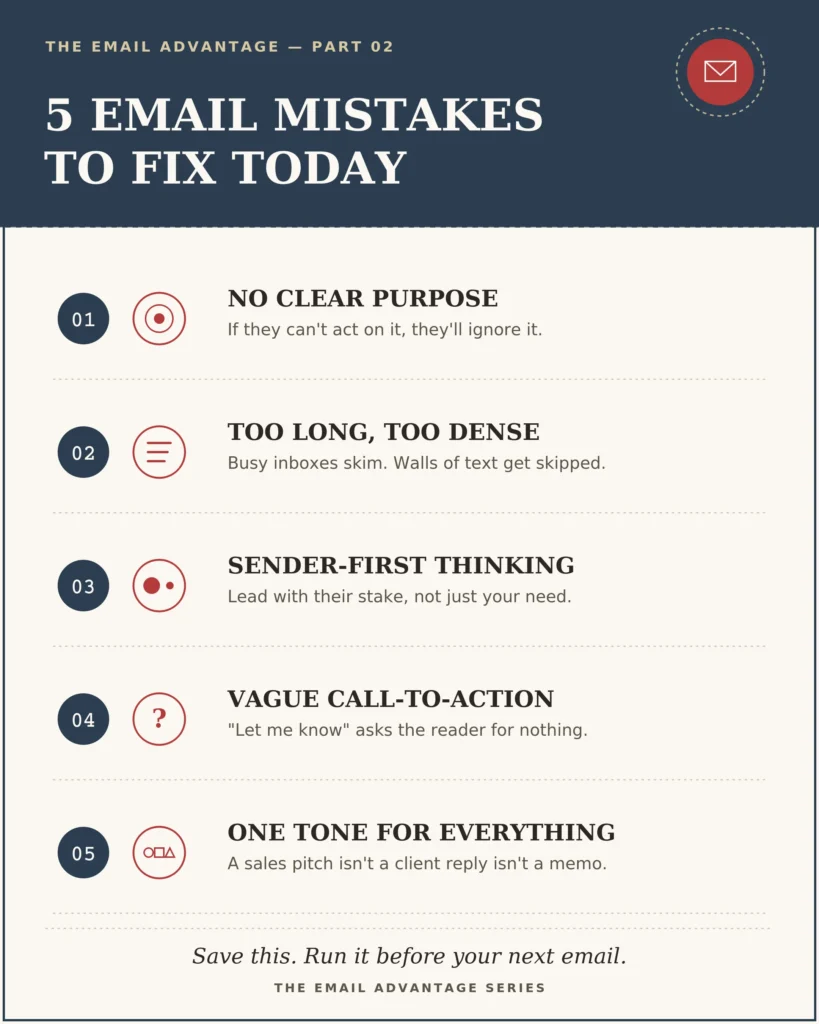
Mistake 1: Sending Emails Without a Clear Purpose
This is the most common email mistake — and the most consequential.
Many professionals start writing before they have decided what they actually want from the message. They open a compose window, begin typing, and send something that transfers words from their mind to the reader’s screen without a clear outcome attached.
The result is an email the reader skims, files mentally as “low priority,” or ignores entirely — not because they do not care, but because they genuinely do not know what to do with it.
A successful email should answer one question before anything else: What result do I want from this message?
Not “what do I need to say?” — but “what do I need to happen?” Those are different questions, and they produce fundamentally different emails.
Before:
“Hi James, just wanted to share this information with you. Let me know.”
This email has no purpose the reader can act on. It is unclear what “this information” is meant to accomplish and what “let me know” means. Let James know what, exactly? That he received it? What he thinks? Whether he approves it?
After:
“Hi James, sharing the updated proposal for your review ahead of Thursday’s call. If the pricing section looks good to you, we are ready to move to the next stage. Does the proposal work, or would you like to adjust anything before Thursday?”
Same general situation. Entirely different level of clarity. The second version tells the reader what they are looking at, why it matters, what happens next, and exactly what they are being asked to confirm.
The fix: Before you type a single sentence, write down the answer to this question: “After reading this email, what should the reader know, feel, or do?” Once you have that answer, build the email backwards from it.
Clarity about purpose is not just good manners — it is what gets emails answered.
Mistake 2: Making Emails Too Long and Difficult to Read
Here is a reality of professional life: nobody reads their inbox the way they read a novel. Business emails are scanned, not studied.
Professionals receive dozens — sometimes hundreds — of emails per day. In that environment, a long, dense email is not an act of thoroughness. It is a burden placed on the reader. And readers who are busy respond to that burden in one of two ways: they skim for relevance and miss key information, or they defer the email to “deal with later” — which often means never.
The problem is not length alone. It is unstructured length. Long paragraphs without visual breaks force the reader to slow down and hunt for what matters. Excessive background information buries the actual request. Multiple points presented in a single continuous block make it impossible to quickly identify priority.
The anatomy of a difficult-to-read email:
“Hi Sarah, I wanted to reach out because I have been thinking about the project we discussed last month and I realize we need to move forward on a few things including the design review and also the budget approval which we mentioned needing before end of quarter and I also wanted to check in about whether you had a chance to speak with the legal team as that was something we touched on in our last conversation before the holidays. Also the timeline might need to shift if we cannot get the approvals done this week so let me know about all of this when you have a moment. Thanks.”
This is one of the most common patterns in professional email — a stream-of-consciousness message that contains several legitimate requests but buries all of them in a wall of text with no visual structure.
The same email, restructured:
“Hi Sarah,
Following up on our project discussion — three quick items before the end of this week:
- Design review — Can you confirm the timeline for this? We need it scheduled before the 20th.
- Budget approval — Is this ready to proceed, or are there outstanding items?
- Legal sign-off — Were you able to connect with the legal team after our last call?
If any of these are delayed, it will affect our quarter-end timeline, so any updates by Thursday would be really helpful.
Thanks, [Name]”
Same information. Completely different reading experience.
The fix: Apply three structural rules to every professional email:
✓ Short paragraphs. No more than two to three sentences per paragraph. White space is your friend.
✓ Bullet points for multiple items. If you are making more than one request or point, list them separately so each gets full attention.
✓ Most important information first. Do not save the key point for the third paragraph. Put it in the first two sentences.
A shorter, scannable email is not a less professional email. It is a more respectful one.
Mistake 3: Writing Emails Without Thinking About the Reader
There is a pattern that shows up constantly in professional email communication: the sender is the only person in the room.
The email is written entirely from the sender’s perspective — what they need, what they want, what their timeline is. The reader’s situation, priorities, and interests are absent.
“I need your feedback today.”
“I need this approved before I can move forward.”
“I want an update on where things stand.”
These emails communicate a request. They do not communicate why that request matters to the reader — or acknowledge that the reader has their own competing demands.
This matters because people respond to things that feel relevant to them. An email that reads like a demand generates resistance. An email that frames the same request in terms of what it means for the reader — their project, their outcome, their success — generates cooperation.
This is not manipulation. It is basic communication intelligence.
Before:
“I need your feedback today. This has been waiting for a while.”
This version is technically true and completely counterproductive. “This has been waiting for a while” is a mild accusation. “I need” puts the sender’s urgency ahead of the reader’s reality. The email is about the sender. The reader has no reason to care.
After:
“Your feedback today will help us finalize the proposal before the client deadline on Friday — I want to make sure your input is included before anything goes out.”
This version contains the same request but reframes it entirely. The reader is not being pressured — they are being given the opportunity to contribute before something important happens. The “I” of the sender has been replaced by “us” and “your input,” which signals collaboration rather than demands.
The psychology behind it: People are motivated by relevance and value. If an email clearly shows why responding matters for the reader’s work, relationship, or outcome — not just the sender’s — the likelihood of a timely, positive response increases significantly.
The fix: Before you send any email, read it back and ask: “If I were the reader, why would I care about this?” If the answer is not obvious from the email itself, add one sentence that makes it clear.
Mistake 4: Weak or Unclear Call-To-Action
An email without a clear next step is like a meeting that ends without decisions.
Everyone was present. Words were exchanged. And then nothing happened, because nobody was sure what they were supposed to do.
Vague closes are one of the most persistent email problems in professional communication. They look polite. They feel low-pressure. But they consistently produce delays, non-responses, and misunderstandings.
Weak closes professionals use without realizing it:
- “Let me know what you think.”
- “Happy to discuss.”
- “Just wanted to check in.”
- “Feel free to reach out.”
- “Keep me posted.”
None of these tell the reader what action to take. They leave the response entirely at the reader’s discretion — which, in a busy professional’s inbox, often means “when I get around to it.”
Before:
“Let me know what you think and we can go from there.”
After:
“Could you confirm which of the two pricing options works best for your team by Wednesday? Once I have your preference, I can send the finalised agreement the same day.”
The second version does four things the first does not: it specifies the decision required (which pricing option), the format of the response (a simple confirmation), the deadline (Wednesday), and the consequence of a timely reply (the agreement sent same day). The reader knows exactly what to do and why doing it quickly benefits them.
The fix: Replace every vague close with a specific action request that answers three questions:
- What should the reader do?
- By when should they do it?
- What happens next when they do?
This level of specificity is not pushy. It is professional. It signals that you have thought about the next step and that you respect the reader’s time enough to make the path forward clear.
Mistake 5: Using the Same Writing Style for Every Situation
A one-size-fits-all email approach is one of the least-discussed professional communication mistakes — and one of the most damaging.
A cold outreach email to a prospective client is not the same as an internal project update. A follow-up after a client proposal is not the same as a networking message after a conference. A professional reply to a complaint is not the same as a friendly check-in with a long-term partner.
Each of these situations has its own stakes, emotional register, expected format, and appropriate level of formality. Writing them all the same way sends mixed signals at best — and inappropriate signals at worst.
Common mismatches professionals make:
- Writing a cold outreach that reads like an internal memo: too formal, no warmth, no relevance to the reader’s world
- Writing a client complaint response that reads like a casual chat: too relaxed, signals lack of seriousness
- Writing a sales follow-up that reads like a demand: impatient tone that damages trust
- Writing a networking email that reads like a pitch: transactional language that undermines the relationship
The fix: Before you write, identify the type of email you are sending and match your approach to that context:
| Email Type | Tone | Priority | Length |
|---|---|---|---|
| Client communication | Professional, clear | Trust and clarity | Medium |
| Sales follow-up | Confident, value-focused | Next step | Short |
| Internal update | Direct, efficient | Information accuracy | Short |
| Networking message | Warm, personal | Relationship building | Medium |
| Complaint response | Empathetic, solution-focused | Restoration of trust | Medium |
Recognising the type of email before you write it is the first step to writing the right email for the situation.
Section 6: The Professional Email Improvement Framework
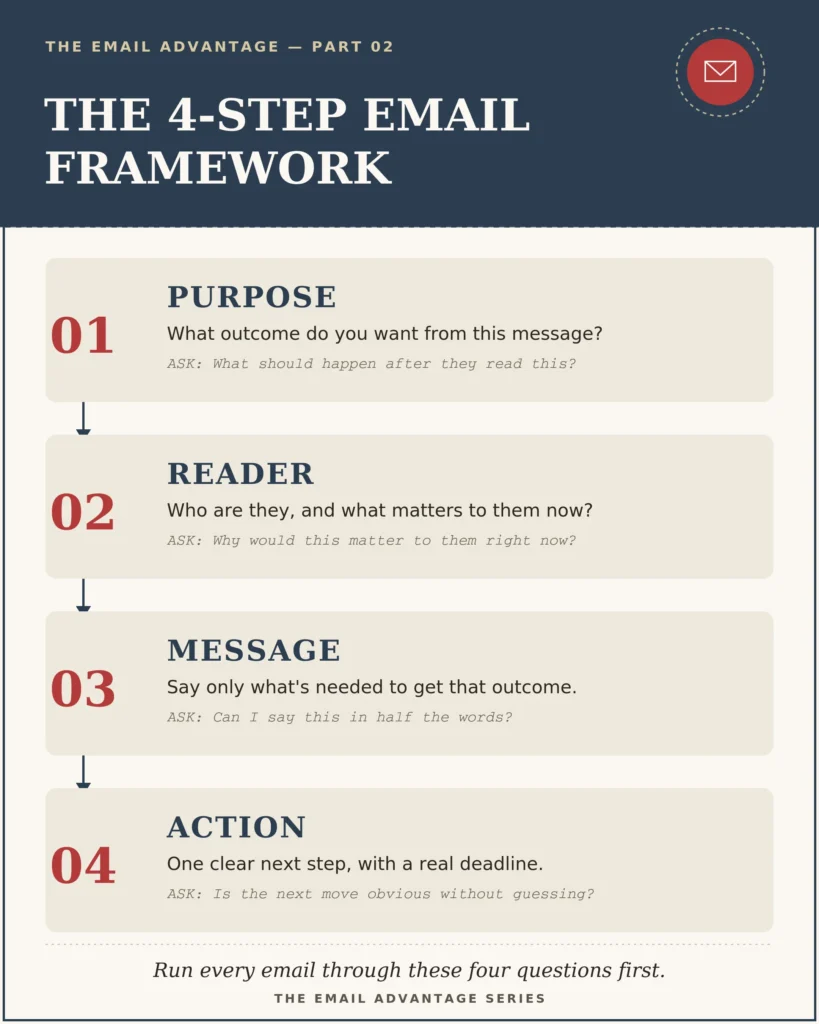
Once you understand what goes wrong in professional emails, the next step is a reliable system for getting them right.
The framework below works for virtually every professional email situation. Before you write — or before you send — run your message through these four steps.
Purpose → Reader → Message → Action
Purpose: What is the single outcome you want from this email? Be specific. Not “share an update” but “get approval to move to the next project phase.” Defining the purpose first prevents you from writing emails that transfer information without creating movement.
Reader: Who is receiving this email, and what matters to them right now? What do they already know? What are their priorities, pressures, or constraints? How much time do they have? Writing with the reader in mind transforms your emails from broadcasts into conversations.
Message: Given the purpose and the reader, what is the minimum you need to say to achieve the result you want? Cut everything else. The clearest email is rarely the longest one.
Action: What is the specific next step, and is it obvious from the email? State it directly. Give a deadline if relevant. Remove any ambiguity about what “responding” looks like.
Example applied:
Situation: Following up on a proposal that has been with a client for five days with no response.
- Purpose: Find out whether the proposal is moving forward and what the client needs to decide.
- Reader: A senior manager who is likely busy and may not have had time to review; possibly waiting for input from someone else; does not want to feel pressured but needs a nudge.
- Message: Brief, warm, specific. Reference the proposal and offer to help with any questions.
- Action: Ask one clear question with a light deadline.
Result:
“Hi David, just checking in on the proposal I sent over last Tuesday. I know this time of year gets busy — happy to answer any questions or adjust anything before you share it internally. Do you have a sense of timing on your end? Even a rough idea would help me plan the next steps from our side.”
This email is 62 words. It checks in without pressure, offers value, and closes with a soft but specific request. The framework made it possible.
Section 7: How Templates Help Professionals Avoid Email Mistakes
Many of the email mistakes covered in this article share a root cause: starting from a blank page.
When you face an empty compose window, you are doing several things simultaneously — figuring out what to say, how to say it, what tone to strike, what structure to use, and what to ask for. Under time pressure, most professionals shortcut one or more of those decisions, which is exactly where mistakes enter.
Professional email templates solve this problem by giving you a proven starting point.
Templates are not about copying. They are about starting smarter.
A well-designed template has already solved the structural and tonal decisions. The purpose is clear. The reader-focused framing is built in. The call to action is direct. All you need to do is add the specific details of your situation.
This has three important effects:
Speed: A situation that might take twenty minutes to write from scratch takes five minutes to adapt from a template.
Consistency: Every client interaction — follow-up, proposal, request, response — maintains a professional standard regardless of the day, your energy level, or how much time you have.
Confidence: When you are navigating a difficult client conversation or an unfamiliar professional situation, a proven structure removes the anxiety of figuring out the right approach in real time.
Templates are not a shortcut around communication skill — they are a way to apply communication skill more consistently.
Stop Writing Every Email From Scratch
Most email mistakes do not happen because professionals do not care. They happen because professionals are busy, working without a system, and reinventing the wheel every single time they sit down to write.
The Ultimate Email Template Vault — 500+ Ready-to-Use Emails
The Email Template Vault is a complete professional email communication system designed for exactly this problem.
With over 500 professionally written and field-tested email templates, it covers the full range of situations business professionals, entrepreneurs, freelancers, sales teams, and client-facing roles encounter in everyday work.
What it includes:
✓ Client communication — onboarding, updates, difficult conversations, relationship maintenance
✓ Sales follow-ups — prospecting, proposal follow-up, re-engagement, objection handling
✓ Business requests — approvals, introductions, referrals, feedback requests
✓ Meeting emails — scheduling, confirming, following up, recapping outcomes
✓ Networking messages — outreach, reconnecting, thank-yous, introductions
✓ Professional replies — handling complaints, responding to feedback, managing delays
✓ Customer communication — queries, updates, problem resolution, appreciation
What it does for you:
- Saves hours every week by eliminating blank-page writing for routine situations
- Builds communication confidence in unfamiliar or high-stakes situations
- Creates consistency across your team’s client and business communications
- Scales your workflow — more emails, handled faster, at a higher standard
This is not a collection of generic templates. Every email in the Vault is built on the same principles covered in this article — clear purpose, reader-focused framing, appropriate tone, specific call to action. They work because they are designed the way professional emails should be designed.
Choose Your Email Improvement Path
Wherever you are starting from, there is a practical resource designed to match your current needs and goals.
Beginner: 100+ AI Email Writing Prompts
Best for creating better emails faster using AI tools like ChatGPT
If you are looking to use artificial intelligence to improve your email communication, the quality of your results depends entirely on the quality of your prompts. This collection gives you 100+ professionally engineered prompts designed specifically for business, sales, and client communication situations — so you get high-quality AI output, not generic drafts.
↓
Professional: 100+ Professional Email Templates
Best for handling the most common professional email situations
A focused library of over 100 templates covering the client and business situations most professionals encounter daily. Structured, practical, and ready to adapt in minutes.
↓
Complete System: The Ultimate Email Template Vault — 500+
Best for professionals who want a complete email communication system
The most comprehensive option — 500+ templates across every category of professional communication. For those who want to be ready for any situation, every time.
Before Sending Any Professional Email — Ask Yourself:
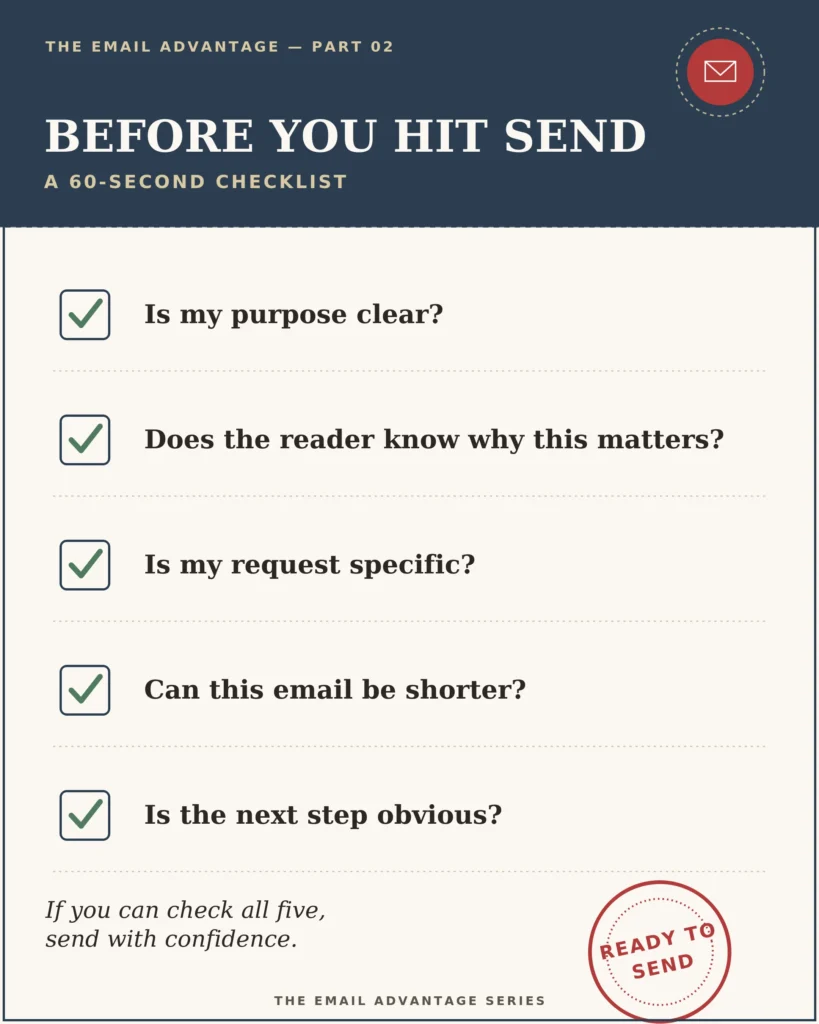
Run through this checklist before you press Send. It takes under sixty seconds and will catch most problems before they reach the reader.
✓ Is my purpose clear? Does the reader know immediately why they are receiving this email?
✓ Does the reader know why this matters to them? Is the relevance to their work, project, or outcome evident?
✓ Is my request specific? Have I asked for one clear thing — not a vague “let me know”?
✓ Can this email be shorter? Is every sentence earning its place, or am I including information the reader does not need?
✓ Is the next step obvious? If the reader does not reply, is it because the email left them unsure what to do?
If you can answer yes to all five, send with confidence. If any give you pause, take sixty seconds to fix them. That sixty seconds is what separates emails that produce results from emails that produce silence.
Better Emails Create Better Opportunities
Your email is more than a message. It is a reflection of how you think, how you operate, and how seriously you take the person on the other end.
Every email you send is an opportunity — to build trust, advance a project, open a door, or strengthen a relationship. And every poorly written email is the quiet cost of a missed opportunity: the proposal that stalls, the follow-up that goes unanswered, the introduction that does not land.
The good news is that none of this requires natural writing talent. It requires intention.
Knowing what you want before you write. Thinking about your reader before you think about yourself. Making the next step so clear that taking it is easier than ignoring it. These are habits — learnable, repeatable, and compounding over time.
Small improvements to how you write create better conversations. Better conversations create stronger relationships. Stronger relationships create better business results.
You do not need to overhaul everything at once. Pick one mistake from this article. Fix it in your next email. Then the one after that. The standard you hold yourself to today becomes the baseline you build from tomorrow.
Start Improving Your Email Communication Today
The resources above are designed to help you move from identifying these mistakes to solving them — permanently, with the right structures in place.
Whether you want to write faster, handle unfamiliar situations with confidence, or build a complete email communication system that works across your team:
→ Explore the Email Template Vault
→ Continue reading The Email Advantage series
Frequently Asked Questions
Q: What are the most common professional email mistakes?
A: The five most common professional email mistakes are: sending without a clear purpose, writing emails that are too long and unstructured, focusing only on what the sender needs without considering the reader, ending with a vague call-to-action that gives the reader no clear next step, and using the same writing style regardless of the email type or situation. Each of these mistakes reduces the likelihood of a timely, positive response.
Q: How do you write a professional email that gets a response?
A: Professional emails that consistently get responses share four characteristics: a clear and specific purpose stated early, framing that makes the content relevant to the reader, concise and scannable structure, and a direct call-to-action with a specific request and deadline. Using the Purpose → Reader → Message → Action framework before writing any email helps apply these principles consistently.
Q: Why do professionals not get responses to their emails?
A: Most unanswered professional emails fail for one of three reasons: the purpose or request was unclear, the email was too long and the key information was not easy to find, or the email contained no specific call-to-action — leaving the reader unsure what they were supposed to do. Addressing these three issues dramatically improves email response rates.
Q: How can email templates improve professional communication?
A: Professional email templates improve communication by providing proven structures that solve three problems at once — what to say, how to say it, and how to end with a clear next step. Templates reduce writing time, ensure consistency across high-stakes communications, and provide a reliable framework for unfamiliar situations. The key is selecting templates built on sound communication principles rather than generic fill-in-the-blank formats.
Q: What is a good professional email structure?
A: An effective professional email follows four structural elements: a clear opening that states the purpose of the email in the first sentence, brief context that gives the reader enough background without unnecessary history, the core message or request framed in terms of relevance to the reader, and a specific call-to-action that tells the reader exactly what to do, by when, and what happens next. Keeping paragraphs short and using bullet points for multiple items improves readability significantly.
Q: How long should a professional email be?
A: Most professional emails should be between 75 and 150 words. Routine communications like follow-ups, confirmations, and simple requests should stay under 100 words. More complex emails — such as proposals, project updates, or detailed requests — can be longer, but should use structure (short paragraphs, bullet points, headers) to make them easy to scan. The rule of thumb: include everything the reader needs to understand and respond, and nothing else.
Q: How do I make my business emails more effective?
A: The most effective improvement you can make to business email communication is to define the purpose before you write — not after. Ask yourself: “What do I want the reader to do after reading this?” Then structure the email to make that outcome clear and easy to achieve. Combining this habit with professional email templates that cover your most frequent situations will produce consistent, measurable improvement in response rates and professional relationships.
This article is Part 3 of The Email Advantage Series — practical guides helping professionals write emails that create clarity, trust, and real business results.