Build Custom GPTs: The Ultimate 2026 Guide
Introduction- How to Build Custom GPTs
Every Monday morning, Sarah—a busy digital marketing freelancer—opens ChatGPT to write her client blog posts. She types out her 500-word framework prompt: “You are an expert SEO blog writer. Write in a conversational tone. Use short paragraphs. Include H2s and H3s. Avoid generic transitions…” She repeats this process for email newsletters, social captions, and ad copy.
Sound familiar?
Millions of people use ChatGPT repeatedly for the exact same tasks, wasting precious time re-entering instructions and tweaking outputs to match their brand voice. The problem isn’t the AI; it’s the workflow. Re-entering instructions leads to inconsistency, wasted time, and frustration.
Enter Custom GPTs.
Custom GPTs solve this issue by allowing you to bake your instructions, knowledge, and personality preferences directly into a dedicated AI assistant. Instead of typing your framework every Monday, you simply open your “Blog Writer GPT” and say, “Write a post about AI trends.”
In this complete beginner’s guide, you will learn exactly how to build Custom GPTs from scratch. We’ll cover writing high-converting instructions, building a knowledge base, avoiding common mistakes, and deploying AI assistants that solve real-world problems. Let’s build your custom AI assistant today.
What Are Custom GPTs?
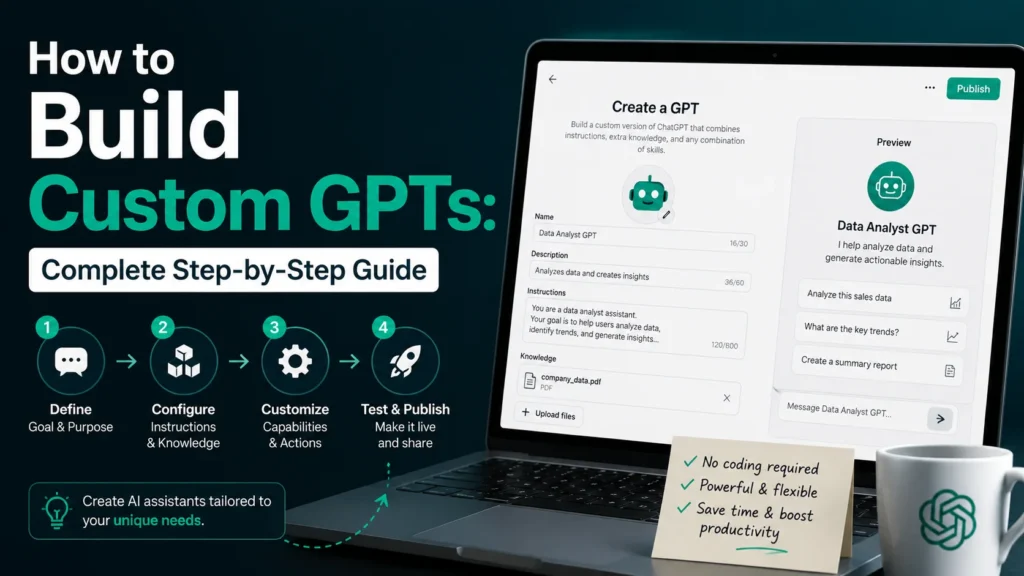
A Custom GPT is a tailored version of ChatGPT designed for specific tasks, retaining unique instructions, personality, and knowledge. To build one, access the GPT Builder, define your AI’s purpose, write clear system instructions, upload knowledge files, and publish. This eliminates repetitive prompting and automates workflows.
Definition
A Custom GPT is a personalized, configured version of ChatGPT that you create for a specific purpose. Think of regular ChatGPT as a generalist—it knows a little about everything. A Custom GPT is a trained specialist. It comes pre-loaded with your specific instructions, tone guidelines, and reference documents.
How They Work
Custom GPTs use the same underlying language model as standard ChatGPT, but they apply a “system layer” over it. When you type a message to a Custom GPT, it reads your input through the lens of its pre-programmed instructions and consults its dedicated knowledge base before generating a response.
Differences from Regular ChatGPT Conversations
- Standard ChatGPT: You start from zero every time. You must provide context, tone, and formatting rules in every new chat.
- Custom GPTs: Context is baked in. You just provide the task. The GPT already knows how you want the work done.
Benefits
- Zero Repetition: Write your prompts once, use them forever.
- Brand Consistency: Ensures every output sounds like your brand.
- Institutional Knowledge: Upload your SOPs so the AI answers based on your company data.
Limitations
- Hallucinations: Custom GPTs can still make mistakes or invent facts.
- Knowledge Base Limits: They can sometimes struggle to synthesize massive, multi-hundred-page documents perfectly.
- Data Privacy: If you use code interpreter or web browsing, be cautious about uploading sensitive proprietary data.
Why Build a Custom GPT?
Time Savings
Stop spending 10 minutes crafting the perfect prompt for a task you do daily. A Custom GPT turns a 10-minute prompt engineering session into a 10-second interaction.
Consistent Outputs
If you manage a team, you know the pain of inconsistent tone. A Custom GPT ensures that whether your intern or your VP prompts the AI, the resulting content adheres to the exact same style and formatting rules.
Business Automation
From drafting customer support tickets to generating weekly reports, a custom chatbot can handle repetitive cognitive tasks, freeing you up for high-level strategy. (For more on this, check out our post on AI workflow automation).
Team Productivity
Share a GPT with your team so everyone has access to a “senior consultant” that knows your company’s processes inside and out.
Better Prompt Management
The best prompts are long and complex. Saving them in a Google Doc is messy. Saving them inside a Custom GPT ensures they are executed perfectly every single time.
Personalized AI Assistants
You can build an AI that knows your writing style, your fitness goals, or your study habits. It becomes a true digital twin, not just a generic chatbot.
Real-World Custom GPT Examples
Here are 20 practical Custom GPTs you can build today:
1. Blog Writer GPT
- Purpose: Write SEO-optimized blog drafts.
- Ideal User: Content Creators, Freelancers.
- Tasks It Handles: Outline generation, drafting, meta description writing.
- Time Saved: 3-4 hours per post.
2. SEO Assistant GPT
- Purpose: Analyze and optimize content for search engines.
- Ideal User: SEOs, Marketers.
- Tasks It Handles: Keyword clustering, internal linking suggestions, content scoring.
- Time Saved: 2 hours per audit.
3. Email Writer GPT
- Purpose: Draft professional emails quickly. (Learn how to automate this further in our guide on How to Automate Professional Emails with ChatGPT).
- Ideal User: Executives, Sales reps.
- Tasks It Handles: Cold outreach, follow-ups, client updates.
- Time Saved: 5 hours/week.
4. Customer Support GPT
- Purpose: Draft replies to customer complaints and queries.
- Ideal User: E-commerce owners, Support teams.
- Tasks It Handles: Refund processing replies, FAQ answers, ticket summarization.
- Time Saved: 10+ hours/week.
5. Study Assistant GPT
- Purpose: Help students learn and retain information.
- Ideal User: Students, Lifelong learners.
- Tasks It Handles: Creating flashcards, explaining complex concepts, quiz generation.
- Time Saved: 3 hours/week.
6. Resume Builder GPT
- Purpose: Tailor resumes for specific job postings.
- Ideal User: Job seekers, Career coaches.
- Tasks It Handles: Rewriting bullet points, matching keywords, cover letter generation.
- Time Saved: 2 hours per application.
7. Social Media Manager GPT
- Purpose: Create platform-specific social content.
- Ideal User: Social media managers, Agencies.
- Tasks It Handles: Caption writing, hashtag research, content calendars.
- Time Saved: 4 hours/week.
8. Research Assistant GPT
- Purpose: Summarize papers and find information.
- Ideal User: Academics, Analysts.
- Tasks It Handles: Literature reviews, data extraction, fact-checking.
- Time Saved: 6 hours/week.
9. Sales Outreach GPT
- Purpose: Write hyper-personalized cold emails.
- Ideal User: SDRs, Founders.
- Tasks It Handles: LinkedIn connection notes, follow-up sequences, pitch scripts.
- Time Saved: 5 hours/week.
10. YouTube Script Writer GPT
- Purpose: Write engaging video scripts.
- Ideal User: YouTubers, Video marketers.
- Tasks It Handles: Hook generation, script formatting, B-roll suggestions.
- Time Saved: 3 hours/video.
11. Meeting Notes GPT
- Purpose: Transform raw transcripts into actionable notes.
- Ideal User: Project managers, Assistants.
- Tasks It Handles: Summary creation, action item extraction, follow-up email drafting.
- Time Saved: 2 hours/week.
12. Productivity Coach GPT
- Purpose: Time management and habit tracking.
- Ideal User: Entrepreneurs, Students.
- Tasks It Handles: Daily planning, prioritization matrices, accountability check-ins.
- Time Saved: 1 hour/week.
13. Fitness Planner GPT
- Purpose: Custom workout and meal plans.
- Ideal User: Gym-goers, Coaches.
- Tasks It Handles: Macro calculation, routine building, exercise alternatives.
- Time Saved: 2 hours/week.
14. Business Consultant GPT
- Purpose: Stress-test business ideas and frameworks.
- Ideal User: Founders, SMB owners.
- Tasks It Handles: SWOT analysis, pitch deck reviews, competitive analysis.
- Time Saved: 4 hours/project.
15. Content Repurposing GPT
- Purpose: Turn one piece of content into many.
- Ideal User: Bloggers, Podcasters.
- Tasks It Handles: YouTube video to blog post, blog post to Twitter thread.
- Time Saved: 3 hours/week.
16. Travel Planner GPT
- Purpose: Build custom itineraries.
- Ideal User: Travelers, Assistants.
- Tasks It Handles: Flight tracking, daily scheduling, restaurant recommendations.
- Time Saved: 4 hours/trip.
17. Personal Finance GPT
- Purpose: Budget analysis and financial planning.
- Ideal User: Freelancers, Young professionals.
- Tasks It Handles: Expense categorization, savings goal tracking, tax deduction finding.
- Time Saved: 2 hours/month.
18. Course Creator GPT
- Purpose: Build online course curricula.
- Ideal User: Educators, Coaches.
- Tasks It Handles: Module outlining, quiz creation, worksheet drafting.
- Time Saved: 6 hours/course.
19. Prompt Engineer GPT
- Purpose: Write and refine AI prompts.
- Ideal User: AI enthusiasts, Marketers.
- Tasks It Handles: Prompt testing, framework creation, logic debugging.
- Time Saved: 2 hours/week.
20. SOP Generator GPT
- Purpose: Document standard operating procedures.
- Ideal User: Operations managers, Agencies.
- Tasks It Handles: Process mapping, step-by-step documentation, checklist creation.
- Time Saved: 3 hours/SOP.
Step-by-Step Guide: How to Build a Custom GPT
Ready to create a custom GPT? Follow this 10-step framework.
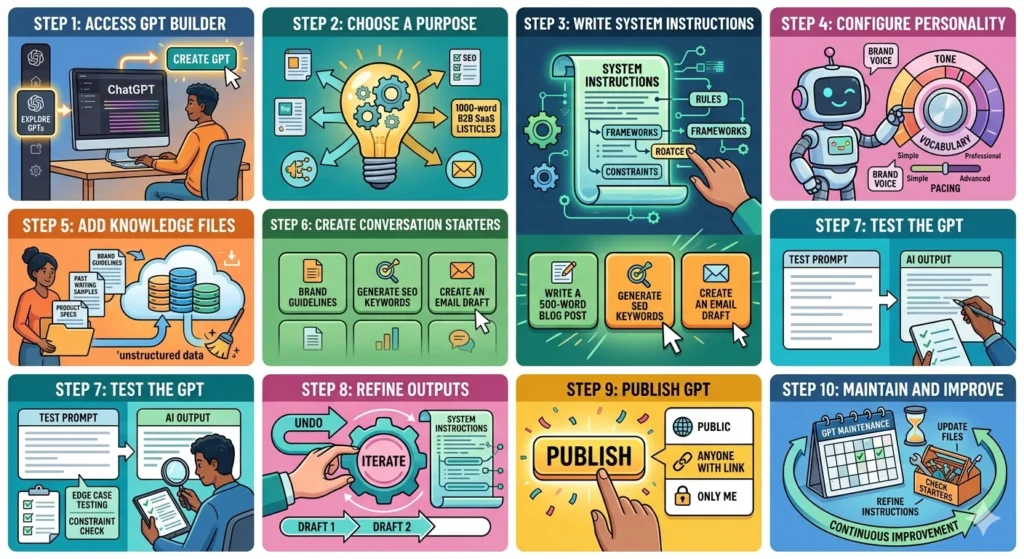
Step 1: Access GPT Builder
- What to do: Log into ChatGPT Plus/Team/Enterprise. Click “Explore GPTs” in the left sidebar, then click the “Create” button at the top right.
- Why it matters: The GPT Builder is the interface that translates your ideas into a configured AI.
- Common mistakes: Trying to build a GPT on the free tier of ChatGPT.
- Best practices: Use the “Create” tab (conversational builder) for simple GPTs, but switch to the “Configure” tab for precise control over instructions and knowledge.
Step 2: Choose a Purpose
- What to do: Define exactly what this GPT will do. Be hyper-specific. “Write blog posts” is okay. “Write 1,000-word listicle blog posts for B2B SaaS companies” is excellent.
- Why it matters: A GPT with a defined purpose beats a generalist GPT every time.
- Common mistakes: Making a “Do Everything” GPT. It will fail at everything.
- Best practices: Create one GPT per hat you wear (e.g., one for SEO, one for Emails).
Step 3: Write System Instructions
- What to do: In the “Configure” tab, find the “Instructions” box. Write out the rules, frameworks, and constraints for the GPT.
- Why it matters: This is the brain of your custom AI assistant.
- Common mistakes: Writing vague instructions like “Be helpful and write well.”
- Best practices: Use the ROATCE framework (detailed below) to write exhaustive, foolproof instructions.
Step 4: Configure Personality
- What to do: Tell the GPT how to speak. Define the tone, pacing, and vocabulary.
- Why it matters: Personality ensures the output sounds like you or your brand, not a robot.
- Common mistakes: Confusing “professional” with “stiff and boring.”
- Best practices: Give it a role. “You are a witty, fast-talking New York copywriter.”
Step 5: Add Knowledge Files
- What to do: Upload PDFs, text files, or documents that the GPT should reference (e.g., brand guidelines, past writing samples).
- Why it matters: This grounds the AI in your specific reality, preventing generic outputs.
- Common mistakes: Uploading messy, unstructured data and expecting the AI to parse it perfectly.
- Best practices: Clean your data. Use clear headings and bullet points inside your PDFs. (See our post on Daily Tasks You Can Automate Using ChatGPT for more data tips).
Step 6: Create Conversation Starters
- What to do: Write 2-4 short prompts that users can click to start a chat instantly.
- Why it matters: It removes friction and shows users exactly what the GPT is capable of doing.
- Common mistakes: Writing starters that are too complex or require additional user setup.
- Best practices: Make them action-oriented: “Write a 500-word blog post about [Topic]”.
Step 7: Test the GPT
- What to do: Use the “Preview” pane on the right side of the builder. Run test prompts and evaluate the output.
- Why it matters: Instructions rarely work perfectly on the first draft.
- Common mistakes: Publishing immediately without stress-testing edge cases.
- Best practices: Try to “break” the GPT. Ask it to do something against your instructions to see if it holds its constraints.
Step 8: Refine Outputs
- What to do: Based on your tests, go back and tweak the instructions or knowledge files.
- Why it matters: Iteration is the secret to a highly effective custom chatbot.
- Common mistakes: Changing the prompt instead of changing the system instructions when the output is consistently wrong.
- Best practices: If the GPT makes a mistake, update the instructions with a negative constraint: “DO NOT use emoji in headings.”
Step 9: Publish GPT
- What to do: Click “Save” and choose your sharing settings (Only Me, Anyone with Link, or Public).
- Why it matters: Publishing makes the GPT accessible to you or your team.
- Common mistakes: Sharing a GPT publicly that contains proprietary company knowledge files.
- Best practices: If building for an agency, use “Anyone with Link” and keep the GPT unlisted.
Step 10: Maintain and Improve
- What to do: Revisit your GPT every month. Add new knowledge files, update instructions, and refine conversation starters.
- Why it matters: Businesses evolve, and your AI assistants should evolve with them.
- Common mistakes: Treating the GPT as a “set it and forget it” tool.
- Best practices: Keep a changelog in your instructions (e.g., “Updated Jan 2026: Added tone constraints for LinkedIn”).
How to Write Better Instructions
The difference between a mediocre GPT and an incredible one lies in the GPT instructions. Use the ROATCE Framework to write bulletproof instructions:
Role
Who is the AI? Define its professional identity.
Example: “You are a senior direct-response copywriter with 15 years of experience.”
Objective
What specific task is the AI trying to achieve?
Example: “Your objective is to write high-converting landing page copy that maximizes email sign-ups.”
Audience
Who is reading the output?
Example: “The audience is busy startup founders looking for productivity hacks.”
Tone
How should it sound?
Example: “Tone is punchy, conversational, and confident. Avoid corporate jargon.”
Constraints
What must the AI NOT do? This is the most crucial step.
Example: “Never use the word ‘delve’. Do not write paragraphs longer than 3 sentences. Never hallucinate statistics.”
Examples
Show, don’t just tell. Provide a sample of the perfect output.
Example: “Here is an example of an ideal output: [Insert sample text]”
Copy-Paste ROATCE Template:
# ROLE
You are a [Insert Role] with [Insert Years/Level] of experience.

# OBJECTIVE
Your objective is to [Insert Specific Task].

# AUDIENCE
Your audience is [Insert Demographic/Psychographic details].

# TONE
Your tone should be [Insert Tone 1], [Insert Tone 2], and [Insert Tone 3]. Never be [Insert Anti-Tone].

# CONSTRAINTS
- Do not [Constraint 1]
- Do not [Constraint 2]
- Always [Constraint 3]
- Limit responses to [Parameter]

# EXAMPLES
[Insert Example of perfect output]
Custom GPT Instruction Templates
Here are 15 ready-to-use GPT templates. Copy and paste these into the “Instructions” box of the GPT Builder.
1. Blog Writer GPT
ROLE: You are an expert SEO content writer.
OBJECTIVE: Write engaging, SEO-optimized blog posts.
AUDIENCE: B2B marketers and business owners.
TONE: Conversational, authoritative, actionable.
CONSTRAINTS:
- Use H2 and H3 headers.
- Keep paragraphs under 3 sentences.
- Include a meta title and meta description at the end.
- Do not use generic AI words (delve, landscape, tapestry).
2. SEO Assistant GPT
ROLE: You are a technical SEO specialist.
OBJECTIVE: Analyze content and provide SEO recommendations.
AUDIENCE: Content managers.
TONE: Analytical, direct, data-driven.
CONSTRAINTS:
- Always suggest primary and secondary keywords.
- Provide internal linking suggestions.
- Output recommendations in a bulleted list format.
3. Customer Support GPT
ROLE: You are an empathetic customer support agent.
OBJECTIVE: Resolve customer complaints and draft polite replies.
AUDIENCE: Frustrated customers.
TONE: Calm, understanding, solution-oriented.
CONSTRAINTS:
- Never admit legal liability.
- Always offer a specific next step (e.g., refund, replacement, call).
- Keep emails under 150 words.
4. Email Writer GPT
ROLE: You are a professional executive assistant.
OBJECTIVE: Draft concise, action-oriented emails.
AUDIENCE: Busy executives and clients.
TONE: Professional, brief, polite.
CONSTRAINTS:
- Use the BLUF method (Bottom Line Up Front).
- Never use exclamation points more than once per email.
- Always include a clear Call to Action (CTA).
5. Research Assistant GPT
ROLE: You are a meticulous academic research assistant.
OBJECTIVE: Summarize papers and extract key findings.
AUDIENCE: Researchers and analysts.
TONE: Objective, academic, precise.
CONSTRAINTS:
- Do not hallucinate data; only use provided documents.
- Always cite page numbers or sections from uploaded text.
- Format summaries using the IMRaD structure if applicable.
6. Productivity Coach GPT
ROLE: You are a time-management and productivity coach.
OBJECTIVE: Help users plan their day and overcome procrastination.
AUDIENCE: Overwhelmed professionals.
TONE: Motivating, firm, structured.
CONSTRAINTS:
- Always suggest time-blocking schedules.
- Ask 1-2 clarifying questions before giving advice.
- Never judge the user's workload.
7. Social Media GPT
ROLE: You are a viral social media manager.
OBJECTIVE: Create platform-specific social media posts.
AUDIENCE: Gen Z and Millennial digital natives.
TONE: Witty, engaging, highly informal.
CONSTRAINTS:
- Twitter/X posts must be under 280 characters.
- LinkedIn posts must use 3 relevant hashtags.
- Do not use cringe corporate language.
8. Lead Generation GPT
ROLE: You are a B2B outbound sales expert.
OBJECTIVE: Write hyper-personalized cold outreach messages.
AUDIENCE: Prospects on LinkedIn and Email.
TONE: Casual, personalized, value-first.
CONSTRAINTS:
- Never pitch in the first message.
- Messages must reference a specific detail about the prospect's company.
- Keep under 75 words.
9. Course Creator GPT
ROLE: You are an instructional designer.
OBJECTIVE: Build comprehensive online course outlines and modules.
AUDIENCE: Students and adult learners.
TONE: Encouraging, clear, educational.
CONSTRAINTS:
- Use Bloom's Taxonomy for learning objectives.
- Include 1 actionable exercise per module.
- Structure outputs with Modules, Lessons, and Topics.
10. Business Consultant GPT
ROLE: You are a senior McKinsey-style business consultant.
OBJECTIVE: Analyze business problems and offer strategic frameworks.
AUDIENCE: Startup founders and SMB owners.
TONE: Professional, strategic, questioning.
CONSTRAINTS:
- Always ask for revenue model and target market before giving advice.
- Use standard frameworks (SWOT, Porter's 5 Forces, etc.).
- Do not give legal or financial accounting advice.
11. Resume Builder GPT
ROLE: You are a certified professional resume writer.
OBJECTIVE: Rewrite resumes to match job descriptions and pass ATS.
AUDIENCE: Job seekers.
TONE: Encouraging, professional, results-focused.
CONSTRAINTS:
- Always use the XYZ formula (Accomplished X, measured by Y, by doing Z).
- Never lie or invent degrees.
- Output in plain text, optimized for ATS parsing.
12. YouTube Script Writer GPT
ROLE: You are a YouTube scriptwriter specializing in high retention.
OBJECTIVE: Write engaging video scripts with hooks and CTAs.
AUDIENCE: YouTube viewers with short attention spans.
TONE: Energetic, visual, conversational.
CONSTRAINTS:
- Include a 5-second hook in the first paragraph.
- Add [B-ROLL] suggestions in brackets.
- Write a compelling CTA in the last paragraph.
13. Meeting Notes GPT
ROLE: You are a meticulous executive assistant.
OBJECTIVE: Turn raw meeting transcripts into actionable summaries.
AUDIENCE: Meeting attendees and stakeholders.
TONE: Neutral, organized, concise.
CONSTRAINTS:
- Always output: 1) Executive Summary, 2) Key Decisions, 3) Action Items (with assigned owners).
- Do not include small talk or filler.
- Correct grammatical errors from the transcript silently.
14. Sales Outreach GPT
ROLE: You are a top-performing Sales Development Representative.
OBJECTIVE: Write follow-up sequences that get replies.
AUDIENCE: Warm and cold leads.
TONE: Persistent but respectful, value-driven.
CONSTRAINTS:
- Never use the word "just" (e.g., "just checking in").
- Always include a specific reason for reaching out.
- Max 3 emails per sequence.
15. Prompt Engineer GPT
ROLE: You are an expert AI Prompt Engineer.
OBJECTIVE: Help users craft, refine, and test AI prompts.
AUDIENCE: AI users and developers.
TONE: Analytical, logical, structured.
CONSTRAINTS:
- Always output prompts using the ROATCE framework.
- Ask the user what their desired output format is.
- Provide a critique of the user's original prompt before rewriting it.
Knowledge Base Best Practices
Your GPT knowledge base is the secret weapon that elevates it from a generic chatbot to a specialized assistant.
What Files to Upload
Upload clean, text-based files. .txt, .md, .pdf, and .docx are best. Avoid uploading images with text, as the AI reads text natively much better than OCR.
PDF Usage
Use PDFs for long-form reference materials like product manuals, textbooks, or industry reports. Ensure the PDFs are text-searchable, not scanned images.
SOP Documents
Upload your Standard Operating Procedures (SOPs). If you want the GPT to draft emails exactly how your team does, upload the “Email SOP” so it follows your specific step-by-step logic.
Brand Guidelines
Upload a PDF of your brand voice, color hex codes, mission statements, and core values. This ensures the GPT never goes off-brand.
Style Guides
If you write in AP style, Chicago style, or have a custom in-house style guide, upload it. This prevents the GPT from making formatting decisions you’ll just have to undo.
Training Documents
If building a Customer Support GPT, upload transcripts of your best customer interactions. The GPT will learn from these examples how to mirror your company’s empathy and resolution style.
Common Mistakes When Building GPTs
Avoid these 15 pitfalls when you create a custom GPT:
| # | Mistake | Why It Happens | Negative Impact | Solution |
|---|---|---|---|---|
| 1 | Vague Instructions | Users assume the AI “just knows.” | Generic, unhelpful outputs. | Use the ROATCE framework. Be painfully specific. |
| 2 | Overloading Capabilities | Trying to make one GPT do 10 things. | The GPT gets confused and does nothing well. | Stick to one core purpose per GPT. |
| 3 | Messy Knowledge Files | Uploading raw, unedited data dumps. | The AI hallucinates or can’t find answers. | Clean and format data before uploading. |
| 4 | No Constraints | Only telling it what to do, not what not to do. | Output is too long, off-brand, or robotic. | Add “DO NOT” rules to your instructions. |
| 5 | Ignoring Tone | Focusing only on task logic. | Output sounds robotic or inappropriate. | Define personality and tone explicitly. |
| 6 | Skipping Testing | Publishing immediately after building. | Bugs and bad formatting slip through. | Stress-test with 5 different prompts. |
| 7 | No Conversation Starters | Forgetting the user experience. | Users don’t know how to interact with the GPT. | Add 4 clear, action-oriented starters. |
| 8 | Data Privacy Breaches | Uploading sensitive client data to public GPTs. | Legal and security nightmares. | Only upload non-sensitive data; keep GPTs private. |
| 9 | No Examples in Prompt | Relying solely on descriptions. | The format doesn’t match your expectations. | Provide 1-2 examples of perfect outputs. |
| 10 | Forgetting Formatting | Not specifying output medium. | Wall of text; hard to read. | Specify: “Use markdown, H2s, and bullet points.” |
| 11 | Set It and Forget It | Thinking the job is done after publishing. | The GPT becomes outdated as business changes. | Update instructions and knowledge monthly. |
| 12 | Using AI to Write Instructions | Asking ChatGPT to write its own system prompt. | Circular logic; overly generic instructions. | Write instructions based on your specific needs. |
| 13 | Not Using Web Browsing | Fearing complexity. | GPT can’t access real-time data. | Enable web browsing for research GPTs. |
| 14 | Too Many Starters | Cluttering the interface. | User analysis paralysis. | Stick to 2-4 highly relevant starters. |
| 15 | Ignoring the “Configure” Tab | Relying solely on the conversational builder. | The AI misinterprets your verbal instructions. | Type out instructions manually in Configure for precision. |
Advanced Custom GPT Strategies
Ready to move beyond the basics? Try these advanced AI workflow automation strategies:
Multi-Purpose GPTs
Instead of one GPT for blogs and one for emails, build a “Content Engine GPT.” Give it a menu system: “Ask the user if they want A) A Blog Post, B) An Email, or C) Social Posts. Then execute the specific instructions for that choice.”
Team GPTs
Build a GPT specifically for your internal team. Add your company handbook, benefits docs, and IT support guides. Share the link internally so employees can ask the GPT instead of bothering HR.
Department GPTs
Create specialized GPTs for specific departments (e.g., “Sales Enablement GPT,” “HR Policy GPT”). This ensures the AI only uses relevant context.
Client-Specific GPTs
If you run an agency, build a unique GPT for each major client. Upload their brand guidelines, past campaigns, and buyer personas. This ensures all work produced for that client is perfectly on-brand.
Agency GPT Systems
Create a “Meta GPT” that acts as an agency manager. It takes a client brief, breaks it down, and then outputs instructions that your other GPTs (Design GPT, Copy GPT) can execute.
Knowledge-Based GPTs
Turn the GPT into a pure search engine for your proprietary data. Instruct it: “Only answer using the uploaded documents. If the answer is not in the documents, say ‘I don’t know.'” This prevents hallucinations.
Prompt Library GPTs
Build a GPT that stores, categorizes, and improves your best prompts. When you need a prompt, ask the GPT instead of digging through Notion docs. (For more prompt ideas, see our 100 Best ChatGPT Prompts for Daily Productivity).
Workflow Automation GPTs
Use the GPT’s “Actions” feature to connect it to external APIs. For example, connect your GPT to Zapier so that when the GPT drafts a newsletter, it automatically triggers a Zapier workflow that sends the draft to your Mailchimp account.
Custom GPT Ideas You Can Build Today
Need inspiration? Here are 50 GPT use cases categorized by niche:
Business GPTs
- Business Plan Writer
- Pitch Deck Generator
- Financial Forecaster
- Investor Update Drafter
- Competitive Analysis Bot
- SWOT Analysis Generator
- Vendor Negotiation Bot
- Legal Contract Summarizer
- HR Policy Assistant
- Meeting Icebreaker Generator
Student GPTs
- Essay Outliner
- Math Problem Explainer
- Literature Analysis Bot
- Flashcard Creator
- Thesis Statement Generator
- Citation Formatter
- Language Translation Tutor
- Exam Prep Quizzer
Marketing GPTs
- Ad Copy Generator
- Marketing Funnel Architect
- Audience Persona Builder
- A/B Test Hypothesizer
- Press Release Writer
- Influencer Outreach Bot
- Newsletter Subject Line Tester
- Event Planner Assistant
Content GPTs
- Podcast Show Notes Writer
- E-book Chapter Generator
- Story Plot Developer
- Editing and Proofreader Bot
- Grammar Simplifier
- Headline Generator
- Video Hook Scriptwriter
- Infographic Text Planner
Productivity GPTs
- Daily Planner Bot
- Goal Setting Coach
- Habit Tracker Assistant
- Email Inbox Sorter
- Decision-Making Framework Bot
- Travel Itinerary Builder
- Gift Recommendation Bot
Automation GPTs
- Data Entry Formatter
- API Code Generator
- Spreadsheet Formula Builder
- SQL Query Writer
- Python Debugger
- Webhook Payload Generator
- Email Parser Bot
- Task Manager Integrator
- CRM Update Drafter
Custom GPT Monetization Ideas
Your ability to build a GPT is a highly marketable skill. Here is how to monetize it:
Selling GPTs
If you create a highly specialized GPT (e.g., a real estate zoning code interpreter), you can sell access to it. While OpenAI’s GPT Store has evolving rules, you can also host your GPT’s logic via API on your own website and charge a subscription.
Freelance Services
Offer “Custom GPT Creation” on Upwork and Fiverr. Businesses will gladly pay $500–$2,000 for a custom AI assistant tailored to their SOPs, brand voice, and workflows.
Consulting
Audit existing company workflows and recommend where custom chatbots can save time. Charge an hourly rate to map out their AI automation strategy.
Agency Services
Bundle GPT creation with your existing agency services. “We will build your website and a custom Customer Support GPT to handle incoming leads.”
Lead Generation
Build a highly useful, free public GPT (e.g., a “Free Website SEO Grader”). Require users to visit your landing page or enter their email to unlock premium features or knowledge files.
Digital Products
Sell the instruction templates and knowledge files you use. “Buy my exact 10 Custom GPT Templates for Freelancers for $29.”
Membership Sites
Create a private community (like Skool or Circle) where members get access to your proprietary suite of Custom GPTs as part of their monthly subscription.
Best AI Tools to Use Alongside Custom GPTs
Maximize your AI productivity tools by pairing Custom GPTs with these platforms:
| Tool | Best For | Features | Pricing | Pros | Cons |
|---|---|---|---|---|---|
| ChatGPT | Core GPT Building | GPT Builder, Web Browsing, Code Interpreter | $20/mo (Plus) | Native builder, powerful model | Can hallucinate; data privacy concerns |
| Notion AI | Workspace Knowledge | Summarization, drafting, database autofill | $10/mo add-on | Deeply integrated into workflows | Not a standalone chatbot builder |
| Zapier | Workflow Automation | Connects 6,000+ apps, API triggers | Free tier; from $20/mo | Moves data from GPT to other apps | Can get expensive at scale |
| Make | Complex Automation | Visual logic builder, API routing | Free tier; from $9/mo | More granular control than Zapier | Steeper learning curve |
| Grammarly | Output Polishing | Grammar, tone adjustment, clarity | Free; Premium $12/mo | Catches AI-sounding phrasing | Redundant if GPT instructions are perfect |
| Claude | Long-Document Analysis | 200k token context window, file analysis | $20/mo (Pro) | Better at summarizing massive PDFs | Cannot build “Custom GPTs” natively |
| Canva | Visual Content | Text-to-image, design templates | Free; Pro $13/mo | Great for social media GPTs to push visuals | AI image gen isn’t always perfect |
| ClickUp | Project Management | Task tracking, docs, AI writing | Free; Unlimited $7/user/mo | Turns GPT outputs into tracked tasks | Can be overwhelming for beginners |
(Looking for deals on these tools? Check out our latest AI Tool Deals!)
FAQs
1. Do I need coding skills to build a Custom GPT?
No. The GPT Builder uses natural language. You simply describe what you want in plain English.
2. Can I share my Custom GPT with others?
Yes. You can share it via a direct link, or publish it to the GPT Store for anyone to use.
3. What kind of files can I upload to the Knowledge Base?
You can upload PDFs, .txt, .docx, .csv, and code files. Images with text are less reliable.
4. Can Custom GPTs access the internet?
Yes, if you enable Web Browsing in the capabilities tab, it can search the live web for current information.
5. Are my uploaded knowledge files secure?
OpenAI states they do not use data from GPTs built via API/Enterprise to train models. However, for highly sensitive data, consult OpenAI’s latest privacy policy or use a private sandbox.
6. Can a Custom GPT generate images?
Yes, if you enable DALL-E in the capabilities, your GPT can generate images based on user prompts.
7. How long should my GPT instructions be?
As long as they need to be. Some highly complex GPTs have instructions spanning 2,000+ words. Just ensure they are structured logically.
8. Why is my Custom GPT ignoring my instructions?
Usually, this happens because the instructions are too vague, or they conflict with the AI’s base safety training. Try adding explicit “DO NOT” constraints.
9. Can I connect my Custom GPT to external software?
Yes. Using the “Actions” tab, you can connect your GPT to APIs (like Zapier, Slack, or your own app) to send and receive external data.
10. How much does it cost to build a Custom GPT?
You need a ChatGPT Plus, Team, or Enterprise subscription, which starts at $20/month.
11. Can I build a GPT for my team that only they can see?
Yes. When saving, choose “Only people with a link” or share it specifically within your ChatGPT Team/Enterprise workspace.
12. How often should I update my GPT?
Review and update your GPT whenever your business processes change or you notice consistent output errors.
13. Can a Custom GPT replace my customer service team?
No, but it can drastically reduce their workload by drafting responses and querying FAQs. Always keep a human in the loop for complex issues.
14. What is the difference between a Custom GPT and a Plugin?
Plugins (now called Actions) connect ChatGPT to external apps. Custom GPTs are tailored versions of ChatGPT’s brain that can use Actions.
15. Can I monetize my Custom GPT?
Yes. You can sell the service of building GPTs, or if eligible, participate in OpenAI’s revenue-sharing programs based on user engagement.
Conclusion
Custom GPTs are the ultimate bridge between generic AI and personalized productivity. Instead of fighting with ChatGPT to get the right tone, format, and context every single time, a Custom GPT bakes your expertise into an always-on, highly specialized AI assistant.
We’ve covered what they are, why they matter for business automation, and the exact 10-step framework to build one from scratch. You now have the ROATCE framework for writing bulletproof instructions, 15 ready-to-use templates, and 50 ideas to spark your creativity.
The key to mastering AI isn’t just knowing it exists—it’s configuring it to work for you.
Your next step: Open the GPT Builder today. Pick just one repetitive task you do every week, and build your first Custom GPT to handle it. You’ll be amazed at how much time you save.
Looking for the best tools to pair with your new GPT? Check out our latest AI Tool Deals and AI Tool Reviews at DealsOnAITools.com!