Daily Tasks You Can Automate Using ChatGPT (Complete Beginner Guide for 2026)
Daily Tasks You Can Automate Using ChatGPT (Complete Beginner Guide for 2026)
Imagine this: You wake up, open your laptop, and your inbox is already sorted, your social media captions are ready, your weekly schedule is drafted, and your latest blog post has a working first draft — all before your morning coffee.
That’s not a fantasy. For millions of people around the world, that’s Tuesday.
AI tools — and ChatGPT in particular — have quietly become the most powerful productivity upgrade available to anyone with an internet connection. You don’t need a technical background. You don’t need a big budget. You just need to know where to start.
By the end of this guide, you’ll know exactly which daily tasks you can automate using ChatGPT, how to build a simple workflow that saves you hours every week, and how to do all of it starting today — for free.
Let’s get into it.

What Does “Automating Tasks with ChatGPT” Actually Mean?
Before diving in, let’s clear something up — because “automation” sounds more complicated than it actually is here.
ChatGPT automation doesn’t mean robots running your entire business. It means using AI to handle the thinking, writing, and planning work that eats up your time. You type a clear instruction (called a prompt), and ChatGPT produces a result in seconds — a reply, a plan, a summary, a script, a draft.
A Simple Way to Think About It
Think of ChatGPT as an extremely capable assistant who never gets tired, never complains, and is available 24 hours a day, seven days a week.
You give it a task. It handles it. You review, adjust if needed, and move on.
That’s the loop. That’s the automation.
The only skill required at the start is learning how to ask clearly. The better your instructions, the better the output. And you’ll get better at that naturally the more you use it.
💡 Key term: A prompt is simply the instruction or question you type into ChatGPT. Think of it as telling your assistant exactly what you need.
Why More People Are Using ChatGPT for Daily Work
Here’s a number worth thinking about: workers who use AI tools in their daily workflow report saving an average of 2–3 hours per day on routine tasks. Across a five-day work week, that’s 10–15 hours back in your pocket every single week.
That time compounds. Those hours can go into learning a new skill, launching a side project, growing a client base, or simply having more breathing room in your day.
The Real-Time Value You Get
Using ChatGPT daily isn’t just about speed — it changes the quality of what you produce too.
- Students use it to understand complex topics faster and structure better essays
- Freelancers use it to deliver work faster and take on more clients
- Content creators use it to stay consistent without burning out
- Entrepreneurs and business owners use it to handle repetitive communication and planning
- Job seekers use it to write stronger applications and prepare for interviews
The common thread? Everyone gets more done without working more hours.
📌 Quick summary: ChatGPT automation means using AI to handle repetitive, time-consuming tasks — writing, planning, summarizing, and organizing — so you can focus on higher-value work that actually moves the needle.
Also You May Like: 50 Best AI Tools in 2026 (Free & Paid) for Creators, Businesses & Beginners
10 Daily Tasks You Can Automate Using ChatGPT Today
These are not theoretical. Every single one of these is something real users are doing right now, with nothing more than a free ChatGPT account.
1. Writing and Replying to Emails
Email is one of the biggest time drains in modern work. Most professionals spend hours every week crafting, editing, and sending emails — many of which follow the same pattern.
ChatGPT can write:
- Professional follow-up emails
- Cold outreach messages
- Customer inquiry replies
- Complaint responses
- Thank-you notes and check-ins
Try this prompt:
“Write a polite follow-up email to a client who hasn’t responded to my proposal in 5 days. Keep it short, friendly, and professional.”
In under 10 seconds, you have a ready-to-send draft. Review it, personalize the name, and send.
⚡ Quick Tip: Save your best email prompts in a simple notes app. Next time you need the same type of email, just tweak the prompt and regenerate in seconds.
2. Drafting Social Media Content
Consistency is the hardest part of social media growth. Most creators don’t fail because of talent — they fail because they run out of ideas or time.
ChatGPT can generate:
- Instagram captions for photos or reels
- LinkedIn posts on any topic in your niche
- Twitter/X threads
- Facebook posts for pages or groups
- TikTok video scripts and hooks
Try this prompt:
“Write 5 Instagram captions for a post about the benefits of waking up early. Use an encouraging, motivational tone. Include relevant hashtag suggestions.”
You’ll get five options in seconds. Pick the one that fits your voice, edit lightly, and post.
3. Summarizing Long Documents or Articles
Reading everything in full is no longer necessary. Whether it’s a 50-page PDF, a lengthy research article, or a long business report, ChatGPT can distill it into a clear, concise summary.
Paste the text (or a large chunk of it) into ChatGPT and say:
“Summarize this in 5 bullet points. Highlight the most important takeaways for someone who needs to make a business decision.”
This is especially useful for:
- Students reviewing academic papers
- Professionals staying informed in their industry
- Freelancers researching client industries quickly
4. Brainstorming Ideas on Demand
Every creator knows the blank-page feeling. It’s paralyzing.
ChatGPT completely removes that friction. In seconds, it can generate:
- Blog post topic ideas
- YouTube video concepts
- Product name ideas
- Newsletter topic lists
- Course module outlines
- Marketing campaign angles
Try this prompt:
“Give me 15 YouTube video ideas for a channel about personal finance for people in their 20s. Focus on beginners who have never invested before.”
You’ll have a month’s content calendar in under a minute.
⚡ Quick Tip: Don’t just ask for ideas — ask for angles. “What’s a surprising or counterintuitive take on [topic]?” will give you far more interesting content than “give me ideas about [topic].”
Also You May Like: How to Use ChatGPT for Daily Work in India (Beginner Guide)
5. Creating First Drafts of Blog Posts or Reports
Writing from scratch is slow. Writing from a draft is fast.
ChatGPT can produce a structured first draft of:
- Blog posts and articles
- Reports and proposals
- Product descriptions
- Website copy
- Case studies
The key word here is first draft. You’ll still review, edit, and add your personal experience and perspective. But having a structured starting point cuts writing time by 60–70%.
Try this prompt:
“Write a 600-word introduction for a blog post titled ‘How to Build a Morning Routine That Actually Works.’ Tone: friendly, motivational, practical. Audience: busy professionals.”
Also You May Like: 50 Free AI Prompts That Help You Create & Sell Your First Digital Product
6. Planning and Organizing Your Week
Most people spend 20–30 minutes every Sunday night trying to plan their week. ChatGPT can do this in 30 seconds if you give it the right inputs.
Try this prompt:
“I have these tasks this week: [list your tasks]. Help me organize them into a daily schedule from Monday to Friday, prioritizing by deadline and importance. I work best in the mornings.”
You can also use ChatGPT to:
- Create daily to-do lists from a brain dump
- Break large projects into smaller steps
- Write time-blocked schedules
- Draft weekly review templates
7. Customer Support Replies and Templates
If you run a business, freelance service, or online store, responding to customer questions takes real time — especially when the same questions come in repeatedly.
ChatGPT can help you:
- Create a bank of reply templates for common questions
- Draft personalized responses to complaints
- Write refund policy explanations
- Build FAQ documents for your website
Try this prompt:
“Create 10 customer support reply templates for a small online clothing store. Include: shipping delay, wrong item received, return request, sizing question, and discount request.”
Do this once. Save the templates. Use them for months.
8. Learning New Skills Faster
ChatGPT is one of the best personal tutors available — and it’s available at any hour. Instead of reading 10 articles on a confusing topic, just ask ChatGPT to explain it the way you need to hear it.
Try these learning prompts:
- “Explain [concept] like I’m a complete beginner. Use a simple analogy.”
- “Give me a 7-day learning plan to understand the basics of [skill].”
- “Quiz me on [topic] with 10 multiple-choice questions.”
- “What are the most common mistakes people make when learning [skill]?”
This approach works for coding, marketing, finance, languages, fitness, design — almost any area of knowledge.
⚡ Quick Tip: After ChatGPT explains something, ask: “Now give me a real-world example of how this works.” Theory sticks much better when paired with a concrete scenario.
9. Translating and Simplifying Text
ChatGPT supports dozens of languages and can translate content quickly and naturally. But it can also do something even more useful: simplify complex text.
Use it to:
- Translate emails or documents into another language
- Simplify legal, technical, or academic text into plain language
- Rewrite content at a different reading level
- Make instructions clearer for customers or clients
Try this prompt:
“Rewrite this paragraph so that someone with no technical background can understand it. Use short sentences and simple words.”
10. Generating Captions, Scripts, and Descriptions
If you’re a content creator — on any platform — this one will save you enormous amounts of time.
ChatGPT can write:
- YouTube video descriptions (with SEO keywords)
- Video scripts (intro, main content, outro)
- Podcast episode summaries
- Product listing descriptions for online stores
- Course descriptions for platforms like Udemy or Teachable
Try this prompt:
“Write a YouTube video description for a tutorial called ‘How to Edit Videos on Your Phone for Beginners.’ Include keywords naturally. Keep it under 200 words.”
📌 Section summary: These 10 tasks — emails, social media, summaries, brainstorming, drafting, planning, customer support, learning, translating, and content creation — represent the areas where ChatGPT delivers the fastest, most measurable time savings. Pick one task, start there, and build from there.
How to Set Up a Daily ChatGPT Workflow (Step by Step)
The difference between people who occasionally use ChatGPT and people who genuinely save hours every week is a simple system. Here’s how to build one.
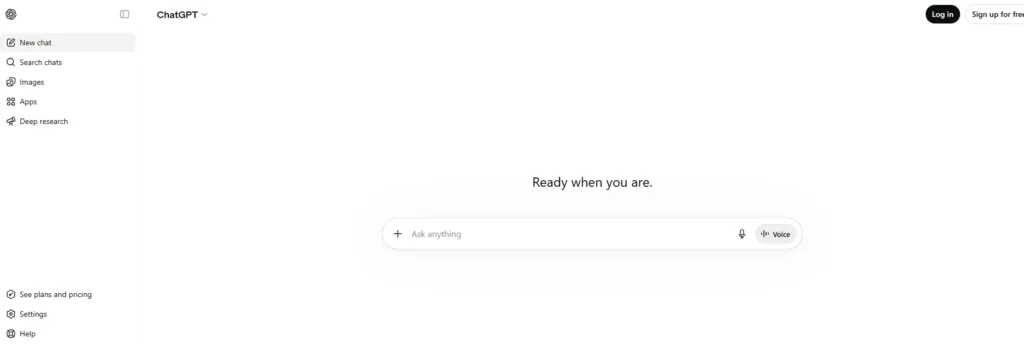
Step 1: Create Your Free Account
Go to chat.openai.com and sign up with your email address. The free plan gives you access to a powerful version of ChatGPT with no credit card required. It works on any device with a browser, and a mobile app is available for both Android and iOS.
Step 2: Identify Your Most Repetitive Tasks
Before touching ChatGPT, spend two minutes writing down the three tasks in your work or daily life that take the most time but are the most predictable. These are your automation targets.
Common answers include: writing emails, producing content, doing research, formatting documents, planning tasks.
Step 3: Write Your First Prompt
Keep your first prompt simple and specific. Include:
- What you want (a draft, a list, a summary, a plan)
- Context (who it’s for, what the topic is)
- Tone (professional, casual, friendly, technical)
- Length (short, detailed, under 200 words, etc.)
Example: “Write a short, friendly email declining a meeting request from a potential vendor. Keep it polite and leave the door open for future communication.”
Step 4: Save and Reuse Your Best Prompts
When you write a prompt that produces a great result, save it. Use a simple notes app, a spreadsheet, or a dedicated tool like Notion. These saved prompts become your personal AI toolkit — a library of shortcuts you can reuse every week.
Step 5: Build a Consistent Habit
The most effective ChatGPT users don’t just use it occasionally — they integrate it into their day. Try this simple structure:
- Morning: Use ChatGPT to plan your day and draft any emails
- Midday: Use it to research, summarize, or generate content
- Evening: Use it to review progress, plan tomorrow, or create content for the next day
Consistency compounds. After 30 days of this habit, you’ll have saved dozens of hours and have a personalized prompt library that works for your exact needs.
⚡ Quick Tip: Treat ChatGPT like a conversation, not a vending machine. If the first output isn’t quite right, reply with “Make it shorter” or “Change the tone to be more casual” — just like you’d give feedback to a real assistant.
Best Free Tools to Use Alongside ChatGPT
| Tool | What It Does | Best Feature | Free Plan | Works On | Beginner-Friendly? |
|---|---|---|---|---|---|
| ChatGPT | AI writing, planning, and conversation | Versatile across all tasks | Yes (generous limits) | Web, iOS, Android | ✅ Yes — start here |
| Notion | Notes, task management, and AI writing assistance | All-in-one workspace | Yes | Web, iOS, Android, Desktop | ✅ Yes — great for saving prompts |
| Google Docs | Writing and document collaboration | Real-time editing, free storage | Yes | Web, iOS, Android | ✅ Yes — paste ChatGPT outputs here |
| Canva | Visual content creation | Drag-and-drop design + AI features | Yes | Web, iOS, Android | ✅ Yes — pair with ChatGPT-written captions |
| Zapier | Connects apps and automates workflows | Connects 5,000+ apps | Yes (limited) | Web | ⚠️ Moderate — for when you’re ready to go further |
| Copy.ai | AI content templates | Pre-built templates for marketers | Yes | Web | ✅ Yes — great alongside ChatGPT |
Common Mistakes Beginners Make When Automating with ChatGPT
Learning from other people’s mistakes is one of the fastest ways to improve. Here are the most common errors — and exactly how to sidestep them.
1. Writing vague prompts “Write me something about marketing” is too broad. ChatGPT works best with specific instructions. Always include who the audience is, what tone to use, and what format you want.
2. Copying outputs without reviewing ChatGPT is a starting point, not a final product. Always read the output and check for accuracy, tone, and relevance before using it. AI can occasionally include outdated information or miss your personal context.
3. Giving up after one bad result If the first output isn’t right, don’t stop. Refine your prompt. Add more context. Ask ChatGPT to revise it. The best results usually come after two or three rounds of feedback.
4. Trying to automate everything at once Start with one task. Get good at it. Then add another. Trying to overhaul your entire workflow in one day leads to overwhelm and inconsistency.
5. Not saving good prompts Every time you write a prompt that produces a great result, save it. Most beginners lose their best prompts because they forget to record them. Build your library from day one.
6. Sharing sensitive personal or business information Avoid typing private data — passwords, financial details, confidential contracts — into ChatGPT. Treat it like a public tool and keep sensitive information offline.
7. Using only the default output ChatGPT’s first response is a starting point. You can ask it to make the output longer, shorter, more formal, funnier, simpler, or from a different angle. Use this flexibility.
8. Not asking follow-up questions ChatGPT is conversational. After it answers, you can ask “Why?” or “Can you give me three alternatives?” or “What’s the most important thing to remember here?” — treat it like a dialogue.
Pro Tips to Get Better Results Every Day
Be the editor, not just the requester. Think of ChatGPT as your first draft machine. Your job is to add personality, real-world experience, and accuracy. That combination — AI speed + human judgment — is unbeatable.
Use role prompts for better context. Starting a prompt with “Act as an experienced [profession]…” often produces dramatically better outputs. “Act as a professional customer service manager and write a response to this complaint” gives ChatGPT much clearer direction.
Ask for options, not just one answer. Instead of “Write a subject line for this email,” try “Write five subject line options for this email, ranging from professional to casual.” Having choices makes editing faster.
Use ChatGPT to improve ChatGPT. Ask it to help you write better prompts: “How would you rewrite this prompt to get a better result?” It will often give you a significantly improved version.
Keep a “wins” document. Once a week, note the three tasks where ChatGPT saved you the most time. This keeps you motivated and helps you identify where to automate next.
Frequently Asked Questions About ChatGPT Automation
What daily tasks can I automate with ChatGPT?
You can automate email writing, social media content, document summaries, brainstorming sessions, first drafts, weekly planning, customer support replies, learning plans, translations, and content scripts. Start with whichever task currently takes the most time in your day.
Is ChatGPT free to use?
Yes. ChatGPT has a free tier that is available globally and requires only an email address to sign up. The free version is powerful enough for most daily automation tasks. A paid plan (ChatGPT Plus) unlocks faster responses and additional features.
Do I need coding skills to automate tasks with ChatGPT?
No. Everything covered in this guide requires only clear, written instructions — no coding, no technical background. Just type what you need in plain language.
How do I build a ChatGPT daily workflow?
Start by identifying your three most repetitive tasks. Write a prompt for each one. Test, refine, and save the prompts that work best. Then use these prompts daily, ideally at a consistent time, until the habit sticks.
Can ChatGPT replace a virtual assistant?
For many routine tasks — writing, summarizing, planning, research — ChatGPT handles the work just as effectively. It can’t make calls or browse certain apps independently, but for text-based tasks, it performs at a very high level at zero or low cost.
Is it safe to use ChatGPT for work tasks?
For general professional tasks, yes. Avoid entering personally identifiable information, confidential contracts, or private financial data. Use it for publicly shareable or non-sensitive work content.
Can I use ChatGPT on my phone?
Yes. ChatGPT has official mobile apps for both Android and iOS, and the web version works well on mobile browsers. You can use it anywhere with an internet connection.
What’s the most effective prompt structure for beginners?
Use this structure: “[Role or context] + [What you want] + [Audience or tone] + [Format or length].” For example: “You’re helping a freelance designer. Write a short, friendly email following up on a client proposal. Keep it under 100 words.”
How many tasks can I automate in one day?
There’s no limit to how many prompts you run. The free plan has some message limits per session, but for daily personal or professional use, most users find the free tier more than sufficient.
What is the difference between ChatGPT and other AI automation tools?
ChatGPT is a conversational AI — you interact with it in plain language. Other tools like Zapier or Make focus on connecting apps and automating technical workflows. ChatGPT handles the thinking and writing parts; tools like Zapier handle the moving data between apps part. Many advanced users combine both.
Final Thoughts — Your AI-Powered Day Starts Now
Here’s the truth: AI isn’t going to replace you. But the version of you that uses AI every day will outperform the version that doesn’t — in speed, output quality, and mental energy.
You don’t need to automate everything overnight. Pick one task from this guide — just one. Write your first prompt today. See what comes back. Then tweak it, save it, and use it again tomorrow.
That’s how the habit starts. That’s how the hours accumulate. That’s how people go from feeling overwhelmed by their workload to feeling genuinely in control of their time.
The tools are free. The barrier to entry is low. The only thing left is to start.
If you found this guide useful, consider bookmarking it and sharing it with someone who’s been curious about AI but didn’t know where to begin. And if you’re ready to go deeper, check out our guide on writing better ChatGPT prompts and the best AI tools for content creators in 2026 — both natural next steps on this journey.
You’ve got this.
Related Keywords
- ChatGPT automation
- automate tasks with AI
- ChatGPT beginner guide
- AI productivity tools 2026
- daily workflow with ChatGPT
- ChatGPT prompts for work
- AI automation for beginners
- automate daily tasks free
- ChatGPT for content creators
- how to use ChatGPT daily